Relatable disasters and fixes
Welcome1: A Recovery Story
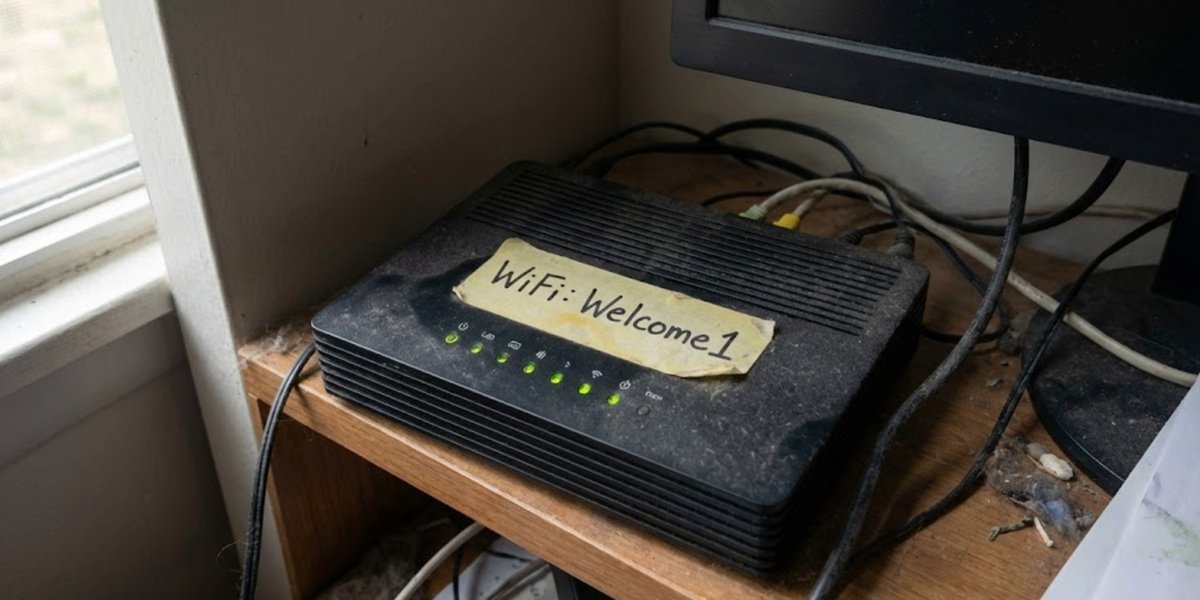
Confessions of a WiFi password that should have been changed years ago
Danny found it on his second day helping us.
He was setting something up on one of the laptops, needed to connect to the WiFi, and asked for the password. Sandra told him. I watched his face change.
"Welcome1?"
"Yes," Sandra said, not understanding the problem. "Capital W. The number one at the end."
"How long has that been the password?"
Sandra thought about it. "Since we got the router, I suppose. Four years? Maybe five?"
Danny looked at me. I looked at the floor.
"Right," he said quietly. "We might need to talk about a few things."
The Audit of Shame
That conversation kicked off what I now call the Audit of Shame.
Danny went through everything. Not accusingly - he was nineteen, what did he know about tact? - but thoroughly. Every system. Every password. Every assumption we'd been operating under.
The WiFi was just the beginning.
The discoveries:
Our email password was "Simpson2019" - the year we'd set up the new system.
The customer database was protected by "Password1" - we'd meant to change it from the default and never had.
Sandra's login was her daughter's name and birthday. She'd written it on a Post-it note stuck to her monitor.
Kev's password was "Buster1962" - my dog's name and my birth year. He'd asked me for a suggestion years ago and I'd given him mine.
The accounting software still had the default admin password. We hadn't even known there was an admin account.
Every single password could have been guessed by someone who knew us slightly. Or someone who didn't know us at all, just knew that humans are predictable.
How Did We Get Here?
I've thought about this a lot since.
We weren't stupid. We weren't careless, not deliberately. We were busy. We were focused on customers and orders and keeping the lights on. Passwords were just... friction. An obstacle between us and the work we needed to do.
"Welcome1" was easy. Everyone could remember it. New staff could get connected immediately. Visitors could use the WiFi without fuss. It was convenient.
Convenience is how security disasters happen.
Nobody woke up one day and decided to be vulnerable. We just made small choices, day after day, that prioritised ease over safety. And four years later, Danny's looking at our WiFi password like we'd left the front door propped open with a brick.
The First Twenty-Four Hours
Danny didn't panic. He did something smarter - he made a list.
Immediate changes (that day):
- WiFi password changed to something actually secure
- Admin passwords on all systems changed
- Post-it notes removed from monitors (Sandra was not pleased)
Short-term changes (that week):
- Every staff member created new, unique passwords
- Password manager introduced - one master password to remember, the software handles the rest
- Two-factor authentication enabled on everything that supported it
Medium-term changes (that month):
- Full security audit of all systems
- Policies documented - what a good password looks like, how often to change them
- Training session for all staff
It sounds like a lot. It was. But once we started, the momentum carried us.
The Resistance
Not everyone was happy.
Kev took the password changes personally. "What's wrong with Buster1962? Nobody's going to guess that."
"Kev," Danny said patiently, "that's the boss's dog and the boss's birth year. It's on his Facebook."
"I'm not on Facebook."
"Jim is. And you used his information."
Kev grumbled for three days. He's now the most security-conscious person in the building. Funny how that works.
Sandra was upset about the Post-it note. "I need to be able to see it. I can't remember all these passwords."
"That's what the password manager is for," Danny explained. "One password to remember. One. The software does the rest."
It took her a week to trust it. Now she evangelises password managers to everyone she meets. Her sister's small business switched over on Sandra's recommendation.
The Password Manager Revolution
If there's one thing that made the difference, it was the password manager.
Before: everyone using simple passwords they could remember, reusing them across systems, writing them down, sharing them casually.
After: unique, complex passwords for everything, generated automatically, stored securely, accessible across devices.
The learning curve was about three days. By the end of the first week, people were wondering why they'd ever done it any other way.
Cost: less than a tenner per person per month. Return: immeasurable.
What "Welcome1" Really Cost Us
We got lucky. Nothing happened.
No breach. No stolen data. No ransom demand. No explaining to customers that their information was compromised because our WiFi password was the digital equivalent of leaving the key under the mat.
But something could have happened. For four years, we were exposed. Anyone parked outside could have accessed our network. Anyone who'd ever visited our office knew the password. Any one of a hundred small moments could have turned into a catastrophe.
The cost of "Welcome1" wasn't measured in money. It was measured in risk we didn't even know we were carrying.
The New Normal
Today, our passwords are a source of pride rather than embarrassment.
Every system has a unique, complex password. Nobody knows them - they're stored in the password manager and auto-filled when needed. Two-factor authentication protects everything important. We rotate critical passwords quarterly.
Danny set up a system that checks for compromised passwords automatically. If any of our credentials appear in a data breach anywhere, we know immediately and change them.
The WiFi password is now a randomly generated string of characters that nobody could guess and nobody needs to remember. Guests get a separate network with its own credentials.
Is it less convenient than "Welcome1"? Slightly. Is it safer? Immeasurably.
What I'd Tell Past Me
If I could go back to the day we set up that router, I'd say this:
Convenience is debt. Every easy choice you make now is a risk you're carrying into the future. The password that's easy to remember is easy to guess. The system you don't bother securing is the system that gets compromised.
You're not too small to be targeted. Small businesses get hit precisely because they think they're too small. We're easier targets than the big firms. Lower defences, same valuable data.
Start right, stay right. It's easier to set up good security from the beginning than to fix bad habits later. The thirty minutes you save with a simple password costs hours when you have to change everything and retrain everyone.
Find your Danny. Someone who knows what they're doing and isn't afraid to tell you the uncomfortable truth. If he hadn't looked at our WiFi password with that expression of quiet horror, we might still be running "Welcome1" today.
Recovery Is Possible
Here's the hope in this recovery story: we fixed it.
Not overnight. Not without friction. Not without Kev sulking and Sandra worrying and me feeling embarrassed about choices I'd made years ago.
But we fixed it. And now we're better than we ever were.
"Welcome1" is dead. Long live the thirty-two-character randomly generated string that I couldn't tell you even if I wanted to.
That's recovery. That's what it looks like.
If we can do it, so can you.
Jim Simpson is an SME Cyber Resilience Consultant with TransCrypt. The original router that hosted "Welcome1" has been securely decommissioned. Danny wanted to frame it. Jim said no.
Ready to streamline your compliance?
Join hundreds of fast-growing fintechs building with Transcrypt today.
Join the WaitlistAbout the Author
"We are building the operating system for compliance. Transcrypt removes the ambiguity from regulatory frameworks, turning them into deterministic, executable code."